
Enhanced conversions and Consent Mode: fix Google Ads tracking before you touch bids
Smart Bidding is only as good as the conversions it sees. Enhanced conversions recover lost sales; Consent Mode keeps measurement working when people decline cookies. Here is how they fit together.
Key takeaways
- Enhanced conversions send hashed first-party data (like email) with your conversions, so Google can count sales cookies miss.
- Consent Mode tells Google tags what the visitor agreed to. It doesn’t collect consent itself.
- Advanced Consent Mode sends cookieless pings when consent is denied, which supports better modelling.
- Check that your conversion value is right before trusting ROAS bidding.
When a Google Ads account underperforms, the first instinct is to change bids, budgets or keywords. In many audits we run, the real problem is upstream. The account is learning from incomplete or wrong conversion data. Fix that first and many other problems shrink.
Why tracking decides bidding
Smart Bidding strategies like Target ROAS predict the value of each auction from past conversions. If a share of sales never reaches Google, or values are wrong, the bidder aims at the wrong target. Our Target ROAS guide explains why clean values matter so much.
Enhanced conversions
Enhanced conversions add hashed customer data to your conversion tags. Typically that’s the email address (and often phone) the customer typed at checkout or on a lead form. Google matches it to signed-in users who interacted with your ads.
What Google says it improves:
- More accurate conversion reporting.
- Cross-device conversions, like a click on mobile and a purchase on desktop.
- Engaged-view conversions from video.
- More durable measurement as privacy rules tighten.
The April 2026 change
Google announced that from April 2026, Google Ads accepts user-provided data from website tags, Data Manager and API connections at the same time. You no longer pick one method. Existing users were moved to a single enhanced conversions on/off setting.
Consent Mode
Consent Mode passes each visitor’s consent choice to Google tags, which adjust their behaviour. It works with your existing consent banner; it isn’t a banner itself.
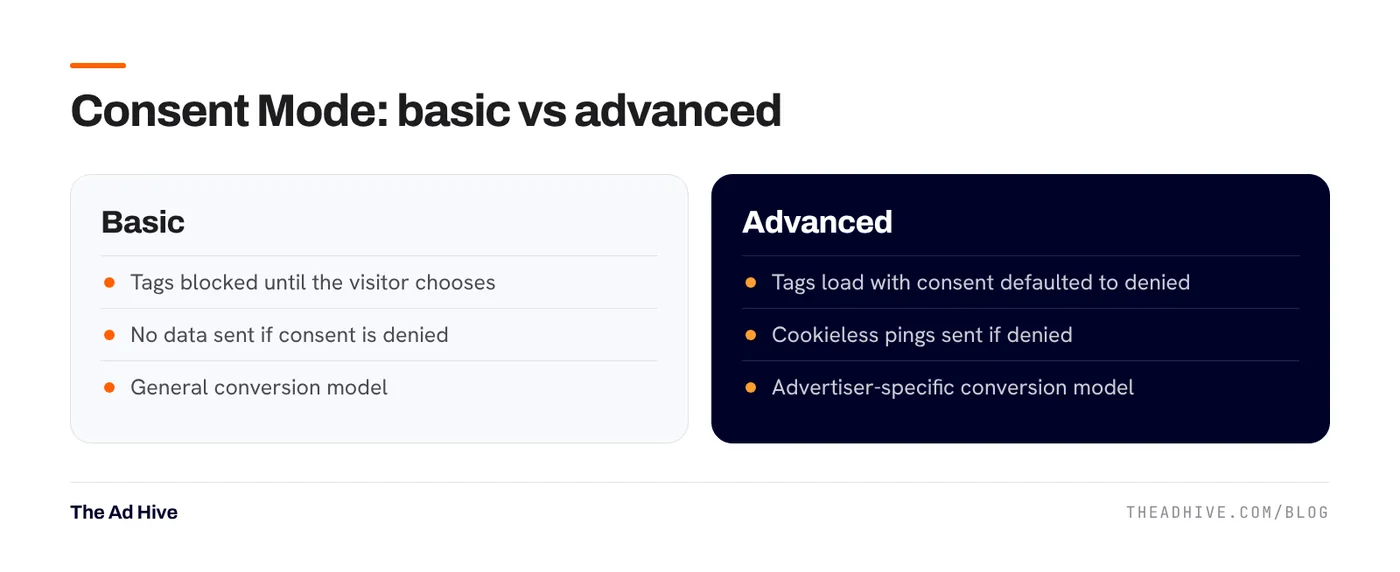
With basic mode, Google tags stay blocked until the visitor chooses. If they decline, nothing is sent, not even the consent status.
With advanced mode, tags load straight away with consent set to denied by default. If the visitor declines, tags send cookieless pings. Google uses these to model conversions it can’t observe, with an advertiser-specific model. Google notes that modelling only applies once your tags meet a data threshold.
India and consent
India’s Digital Personal Data Protection Rules were notified in November 2025, with obligations phased in over the following months. If you collect personal data from Indian users for ads, review your consent flow and privacy policy with your legal adviser. For EEA, UK and Swiss visitors, Google has region-specific consent requirements.
A tracking checklist we run on every account
- Primary conversions are real outcomes. Purchases or qualified leads only. Add to cart and page views stay secondary.
- No duplicate purchase tags. A Google Ads tag plus an imported GA4 purchase, both set as primary, double counts sales.
- Values are right. For a store, value usually equals order value after discounts. Decide whether tax and shipping are in or out, and keep it the same everywhere.
- Enhanced conversions are on and matching. Check the diagnostics in the conversion action.
- Consent Mode is live and your banner actually updates consent states.
- Google numbers roughly match the store. They won’t match exactly because of attribution and returns. A huge gap means something is broken.
- “All conversions” isn’t inflated. If “All conv. value” is far above “Conv. value”, secondary actions are carrying values they shouldn’t.
For lead-gen, the form fill isn’t the sale. Send lead quality back to Google so it learns which leads become customers. See our offline conversion tracking guide.
The Meta side
Meta’s equivalent is the Conversions API with good Event Match Quality. If you run both platforms, fix both. Our Conversions API checklist covers Meta.
Tracking is the first section of our forensic PPC audit, because every other finding depends on it. If you want the fixes done too, our PPC management starts with them.
Frequently asked questions
What are enhanced conversions in Google Ads?
Enhanced conversions send hashed customer data, such as an email address from the checkout or lead form, alongside your conversion tags. Google matches it to signed-in users who interacted with your ads, which recovers conversions that cookies miss.
Is Consent Mode a cookie banner?
No. Consent Mode passes the visitor's consent choice to Google tags so they behave accordingly. You still need a consent banner or consent management platform to collect the choice.
What changed with enhanced conversions in April 2026?
Google said that from April 2026, Google Ads accepts user-provided data from website tags, Data Manager and API connections at the same time, so you no longer choose one method. Existing users moved to a single enhanced conversions on/off setting.
Sources
- Google Ads Help: About consent mode
- Google Ads Help: Your guide to upgrading offline conversion imports
- Google Ads Help: About Target ROAS bidding
- Press Information Bureau: Digital Personal Data Protection Rules, 2025 notified
Sources checked on 15 November 2026. Platform features change often; check the linked pages for the latest details.
Want this done on your account?
We manage Google and Meta ads for e-commerce, D2C and lead-gen brands. Every engagement starts with a manual review of what is already running.
Related guides
Lead gen on Google Ads: feed back lead quality with offline conversions
If Google Ads only sees form fills, it will find you more form fills, good or bad. Sending qualified leads and sales back from your CRM…
Meta Conversions API: setup checklist, deduplication and Event Match Quality
Meta's delivery system can only learn from the purchases it sees. The Conversions API fills the gaps the pixel misses, if you set it up with…

Target ROAS bidding: how to set it, when to change it, and the mistakes that kill volume
Target ROAS is the bid strategy most e-commerce accounts end up on. Set it from your margins, move it slowly, and judge it on more than…