Meta Conversions API: setup checklist, deduplication and Event Match Quality
Meta's delivery system can only learn from the purchases it sees. The Conversions API fills the gaps the pixel misses, if you set it up with proper deduplication and customer data.
Key takeaways
- Run the Conversions API (CAPI, server-side tracking) together with the pixel, sending the same events from both.
- Deduplicate with an identical event_name plus a shared event_id.
- Send more customer details (hashed) to raise Event Match Quality. Unmatched events can’t be used for optimisation.
- Send events in real time or close to it.
Every Meta campaign optimises toward the conversions it can see. Browsers block scripts, people leave pages before they load, and phones restrict tracking. The pixel alone misses some purchases. The Conversions API sends the same events from your server, so far fewer go missing.
Most stores have CAPI “on”. Far fewer have it set up well. Here is the checklist we use.
1. Run pixel and CAPI together
Meta’s own advice is to use the Conversions API in addition to the pixel and share the same events from both. This is called a redundant setup. The server events recover what the browser misses, such as events lost to connection or page-load problems.
On Shopify, the official Meta sales channel can send both. On custom sites, you’ll need a server-side integration or a partner tool.
2. Deduplicate properly
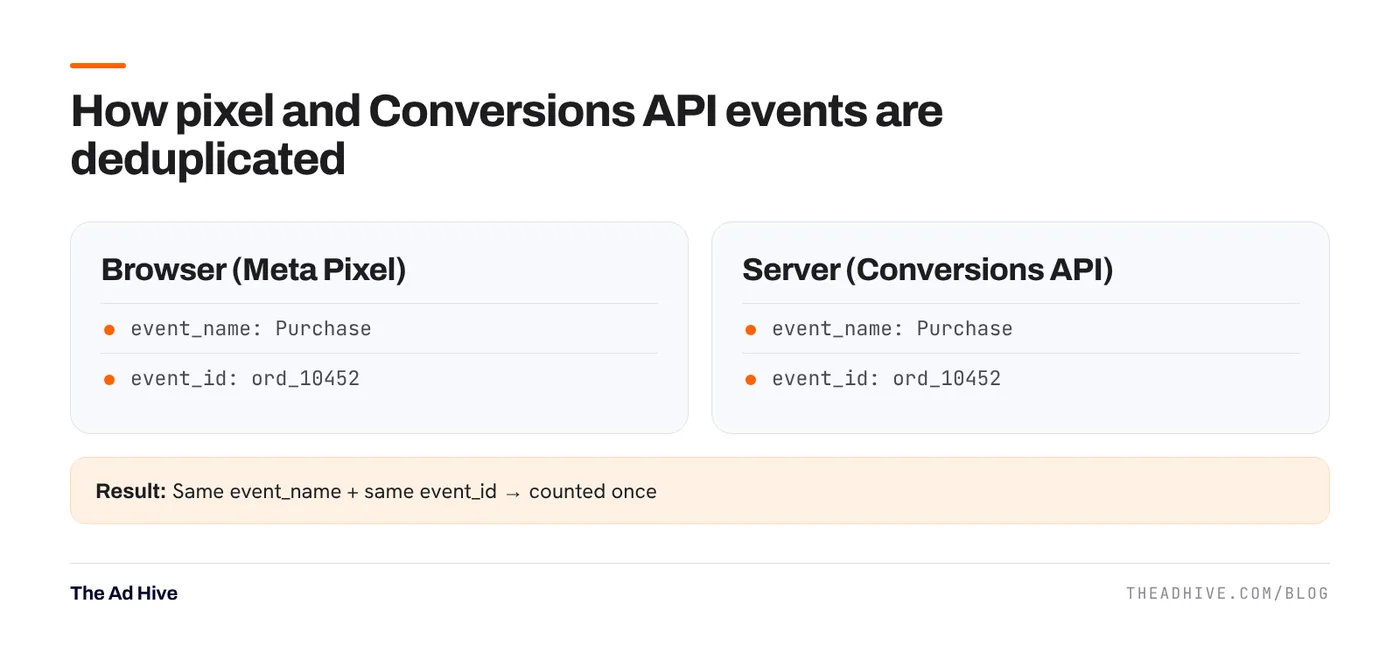
If both sources send the same purchase, Meta must know it’s one purchase, not two.
Meta’s rules:
- Both events must use the identical event_name (for example, “Purchase” in both, not “Purchase” and “purchase_complete”).
- Include event_id, or a combination of external_id and fbp.
- Meta recommends sending external_id and event_id for all events.
A simple pattern is to use the order ID as the event_id for purchases, in both the pixel and the server call.
3. Send customer information
Meta matches server events to people using the customer details you send, such as email (em), phone (ph), first and last name (fn, ln) and IP address. These are hashed before sending where Meta requires it.
Why this matters: Meta says unmatched events can’t be used for attribution or ad delivery optimisation. An event Meta can’t match to a person is close to useless for your campaigns.
4. Check Event Match Quality
Events Manager gives each server event an Event Match Quality (EMQ) score out of 10. It tells you how useful your customer information is for matching. Meta’s wording is simple: higher matching quality produces better results.
How to improve it:
- Send email and phone on every purchase event where the customer gave them.
- Pass fbp and fbc (Meta’s first-party cookie values) from the browser to the server call. Meta notes these values change, so refresh them rather than storing old ones.
- Send external_id (your customer ID) consistently.
- Include IP address and user agent from the original request.
5. Send events fast
Meta recommends sharing events as they happen, either in real time or in batches close to real time. Delayed events help reporting less and help optimisation less.
6. Send the right value
This one isn’t in Meta’s checklist, but we see it break often:
- Purchase value should be order value after discounts, in the right currency.
- Decide whether value includes tax and shipping, and keep it consistent.
- Don’t send the same order twice when a payment gateway redirects back to the thank-you page.
How to verify it works
- In Events Manager, open the Purchase event and check both browser and server are receiving it.
- Check the deduplication view. Server events should overlap with browser events, not add to them.
- Compare a week of Meta purchases with store orders. Meta will differ because of attribution, but a huge gap points to tracking issues.
- Check EMQ for Purchase. If it’s low, see which parameters are missing.
Only send customer data you have collected lawfully and with the consent your market requires. In India, the Digital Personal Data Protection Rules were notified in November 2025 with a phased rollout. Check your privacy policy and consent flow with your legal adviser.
Why it matters more now
Meta’s delivery leans on its own models more than ever. Better data means better matching. Our Andromeda explainer covers why, and our attribution guide covers how to read results. The Google equivalent is enhanced conversions, covered in our enhanced conversions guide.
Tracking checks are the first section of our forensic PPC audit. If CAPI was set up “by an app” and never checked, start there.
Frequently asked questions
Do I still need the Meta Pixel if I use the Conversions API?
Yes. Meta recommends using the Conversions API in addition to the pixel and sharing the same events from both. The server events recover what the browser misses.
What is a good Event Match Quality score?
Meta scores server events out of 10 and says higher match quality produces better results. Aim to send every customer parameter you lawfully have, such as email and phone, hashed, so the score is as high as your data allows.
Why are my purchases double counted?
Usually because pixel and server events don't share the same event_name and event_id, so Meta can't tell they're the same purchase. Fix the IDs and check deduplication in Events Manager.
Sources
- Meta for Developers: Conversions API best practices
- Meta for Developers: Conversions API, verifying your setup
Sources checked on 15 November 2026. Platform features change often; check the linked pages for the latest details.
Want this done on your account?
We manage Google and Meta ads for e-commerce, D2C and lead-gen brands. Every engagement starts with a manual review of what is already running.
Related guides
Meta attribution in 2026: what changed and how to read your results
In January 2026 Meta removed two view-through windows from its reporting API and shortened some historical data. If your Meta numbers suddenly look different from old…

Advantage+ sales campaigns: setup, existing-customer caps and when they work
Advantage+ sales campaigns (formerly Advantage+ shopping) let Meta automate audience, placements and budget in one campaign. Set up well, they are the backbone of most D2C…
Enhanced conversions and Consent Mode: fix Google Ads tracking before you touch bids
Smart Bidding is only as good as the conversions it sees. Enhanced conversions recover lost sales; Consent Mode keeps measurement working when people decline cookies. Here…