
Target ROAS bidding: how to set it, when to change it, and the mistakes that kill volume
Target ROAS is the bid strategy most e-commerce accounts end up on. Set it from your margins, move it slowly, and judge it on more than one week of data.

Key takeaways
- Target ROAS (tROAS, the return you want per rupee spent) tells Google how much value to aim for, not how much to spend.
- Set the target from your margins, then start near what the campaign already achieves.
- Move the target in small steps and wait one to two conversion cycles between changes.
- A target set too high quietly cuts your traffic. Low spend is often the first sign.
Target ROAS is where most e-commerce Google Ads accounts end up. It is powerful, but it is also the setting we see misused most. A target set on gut feel can halve a campaign’s sales in a week, and the account owner rarely connects the two.
How Target ROAS actually works
With Target ROAS, Google predicts the value of each possible conversion at auction time. It then sets bids to get as much conversion value as it can while aiming for your target return.
ROAS is written as a percentage. If you want ₹5 of conversion value for every ₹1 of ad spend, your target is 500%. To see your current ROAS, take the “Conv. value / cost” column and multiply by 100.
Two things follow from this:
- Google bids higher for searches it thinks are worth more, and lower or not at all for the rest.
- Most manual bid adjustments stop working. The only one Google keeps is a -100% device adjustment.
Before you switch it on
Google’s own checklist is short. We add one item.
- Enough data. Search and Shopping need at least 15 conversions in the past 30 days. Demand Gen needs 50 in 35 days in the campaign, or 100 across the account.
- Real conversion values. Google recommends you report values for one to two conversion cycles before using Target ROAS.
- Clean values (our addition). Check that the value sent matches the order value after discounts. If the tag sends the full price before the discount, Google will think every sale is worth more than it is. Our tracking guide shows how to check this.
How to pick the right target
Start from money, not from a number someone heard works for other brands.
Step 1: work out your break-even ROAS
Break-even ROAS is the point where ad spend eats all the profit from the sale. A simple version is:
Break-even ROAS = 1 ÷ gross margin
If your margin after product cost, shipping and payment fees is 40%, break-even ROAS is 1 ÷ 0.40 = 2.5, or 250%. Below that, each sale loses money on the first order.
Step 2: decide what the campaign is for
- Profit now: set the target well above break-even.
- Growth and new customers: you may accept a target near break-even, if repeat purchases make up the gap later.
Step 3: start near reality
Google’s recommended target is based on recent ROAS, leaving out the last few days to allow for late conversions. Start there, or close to the campaign’s last 30-day ROAS. Jumping straight from 300% to 600% almost always chokes delivery.
When and how to change it
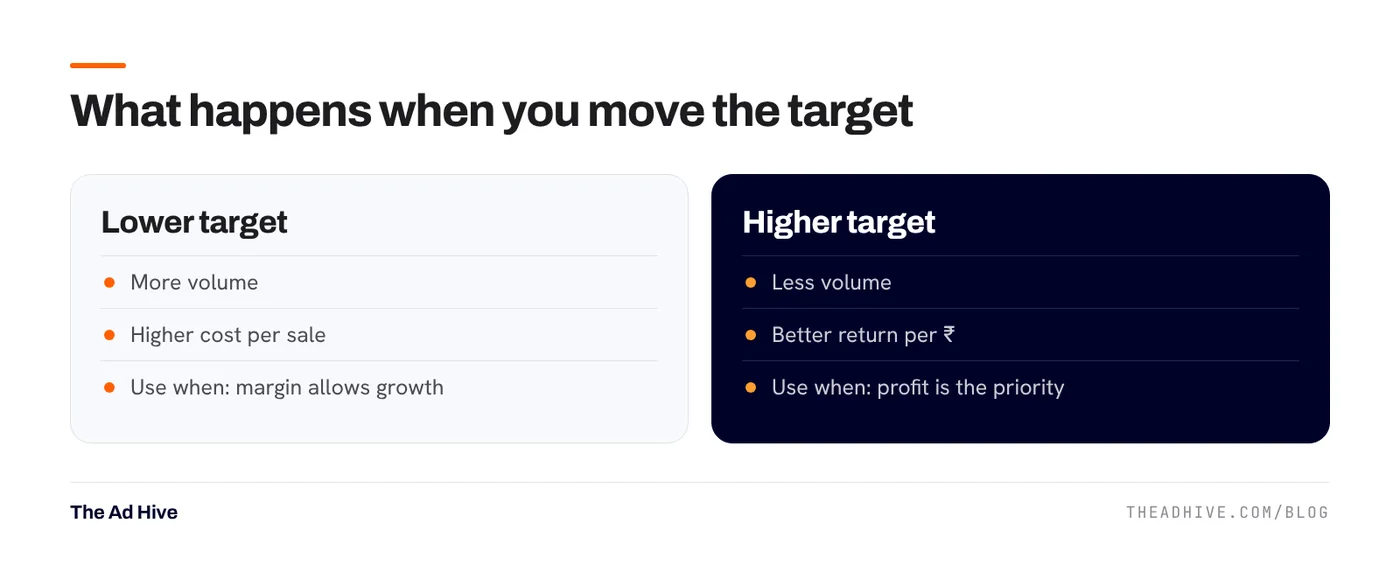
Google’s guidance is clear: lower the target to get more conversions, raise it to get better value per click. The bidder reacts straight away but needs time to settle.
Our rules on client accounts:
- Change the target by about 10–15% at a time.
- Wait one to two conversion cycles before the next change. If buyers usually take five days from click to order, wait one to two weeks.
- Judge results over the whole period, not day by day. Google suggests using the bid simulator to see the likely effect.
- Avoid bid limits. Google discourages them because they restrict how the system bids.
The five mistakes that kill volume
- Target too high. Google says plainly that a target that’s too high may limit traffic. The sign is spend falling below budget while ROAS barely moves.
- Changing it every few days. The system never settles, and you end up judging noise.
- Judging the last three days. Recent days are missing late conversions, so ROAS always looks low at first. Leave a gap before you read results.
- One target for every product. A 70% margin product and a 25% margin product should not share a target. Split them, as we explain in our Performance Max guide.
- Raising budget and target together. These pull in opposite directions. Our scaling guide covers how to grow spend without fighting the bidder.
You can share one Target ROAS across several campaigns as a portfolio strategy. Google notes this is not available for Performance Max, Hotel or Travel campaigns.
Is Target ROAS reporting the truth?
ROAS in Google Ads is based on Google-attributed conversion value. It includes orders later returned or cancelled. That is why we always read it next to store data and blended numbers like MER. If you’re unsure which number should guide your budget, read ROAS vs MER vs POAS.
Not sure your targets are set from real margins? Our forensic PPC audit checks bid strategies, conversion values and targets against your actual numbers.
Frequently asked questions
How many conversions do I need for Target ROAS?
For Search and Shopping, Google asks for at least 15 conversions in the past 30 days. Demand Gen needs at least 50 conversions in the past 35 days in the campaign, or 100 across the account.
What should my first Target ROAS be?
Start close to what the campaign already achieves. Google shows a recommended target based on recent results, leaving out the last few days so late conversions are not missed. Then move it in small steps.
How long should I wait after changing Target ROAS?
Google says the bidder reacts at once but needs time to reach the new target. Allow one to two conversion cycles, meaning the usual time between a click and a sale, before you judge the change.
Sources
Sources checked on 15 November 2026. Platform features change often; check the linked pages for the latest details.
Want this done on your account?
We manage Google and Meta ads for e-commerce, D2C and lead-gen brands. Every engagement starts with a manual review of what is already running.
Related guides

Performance Max best practices for 2026: how to get control back
Performance Max used to be a black box. In 2025 and 2026 Google added the controls advertisers kept asking for. Here is how to use them…

How to scale ad spend without breaking ROAS
Doubling the budget rarely doubles the sales. Scaling works when you add spend in steps, open new demand instead of squeezing old demand, and watch the…
ROAS vs MER vs POAS: which number should run your ad budget?
ROAS tells you what a platform claims. MER tells you what the business got. POAS tells you whether you made money. You need all three, used…