
Performance Max best practices for 2026: how to get control back
Performance Max used to be a black box. In 2025 and 2026 Google added the controls advertisers kept asking for. Here is how to use them well, and when PMax is still the wrong tool.

Key takeaways
- Performance Max (PMax, Google’s all-channel campaign type) now has campaign negatives, shared negative lists, search terms and channel reports.
- In 2026 Google added customer-list exclusions, a budget report, audience reporting and network-level placement reports.
- Control only helps if tracking and your product feed are clean. Fix those first.
- Keep brand search and proven exact-match keywords outside PMax.
For three years the most common complaint we heard about Performance Max was simple: “I can’t see what it’s doing.” Spend went in, conversions came out, and nobody could say which channel, search or audience did the work.
That has changed. Google spent 2025 and early 2026 adding the controls advertisers asked for. This guide covers what is now available, how we use it on client accounts, and where PMax still needs guard rails.
What Performance Max can now show you
Here is the current list, taken from Google’s own help pages.
- Campaign-level negative keywords. Live for all PMax campaigns since 2025. They block Search and Shopping traffic you don’t want.
- Shared negative keyword lists. One list can now cover many PMax campaigns. A premium brand can block “cheap” and “free” everywhere at once.
- Search terms report. Available for all PMax campaigns and through the API.
- Channel performance report. Shows how spend and results split across Search, Shopping, YouTube, Display, Discover, Gmail and Maps.
- Search themes. Up to 50 per asset group (it was 25).
- Device and age controls. Fully available. Gender controls were in beta at the time of writing.
- Full asset stats. Conversions, cost and clicks per asset, not just a “Low / Good / Best” label.
Google’s 2026 update added four more: first-party audience exclusions (keep existing customers out of a new-customer campaign), a budget report that projects month-end spend, full audience reporting by age and gender, and network segmentation in the placement report.
Fix the inputs before you touch the controls
PMax optimises toward whatever you tell it is a conversion. If that signal is wrong, extra control just lets you steer faster in the wrong direction.
- Check your primary conversion actions. Only real outcomes (purchases, qualified leads) should be primary. Page views and add-to-carts belong as secondary.
- Check conversion values. If you bid on value, the value must match what the order is worth. For a store, that usually means order value minus discounts. Read our guide to enhanced conversions and Consent Mode if your numbers look low.
- Clean the product feed. In retail PMax, the feed is your keyword list. Weak titles mean weak matching. Our Shopping feed guide covers the fixes that matter most.
How we structure PMax for e-commerce
There is no single right structure. These are the rules we start from.
Split by margin, not by category name
If two product groups earn very different margins, they need different ROAS targets. Put them in separate campaigns so each can have its own target. Splitting by category name alone often creates campaigns that share the same goal and fight for the same budget.
Give each campaign enough data
Google’s help page for Target ROAS asks for at least 15 conversions in the past 30 days for Search and Shopping. A campaign that gets two sales a week will struggle to learn. Fewer, fuller campaigns usually beat many thin ones.
Keep brand and exact-match winners outside
Brand searches convert well and cheaply. If PMax takes them, its reported ROAS looks great while doing little new work. Run brand in Search, then add a brand exclusion or campaign negatives in PMax so the two don’t overlap.
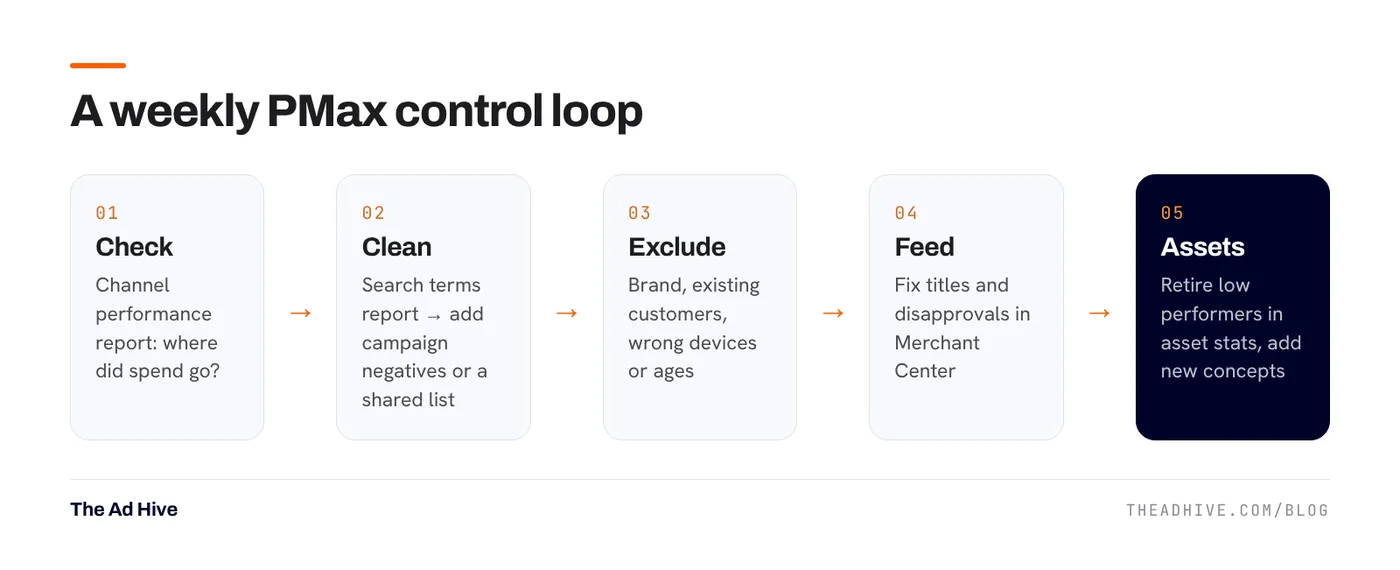
A weekly control routine that works
We run the same five checks every week on every PMax campaign we manage.
- Channel report. Look for spend drifting into placements that never convert. If Display takes a large share with few sales, look at your assets and audience signals first.
- Search terms. Add irrelevant terms as negatives. Use a shared list for words you never want, like “jobs”, “free” or “second hand”. See our negative keyword routine.
- Exclusions. Upload your customer list and exclude it from new-customer campaigns. Check device and age splits for obvious waste.
- Feed health. Disapproved or limited products can’t sell. Check Merchant Center diagnostics.
- Assets. Use full asset stats to retire assets with spend and no conversions. Add new concepts, not small tweaks.
Every negative keyword and exclusion narrows what PMax can find. Add them for clear waste, not for terms that look odd but still convert. Check conversions on a term before you block it.
When Performance Max is the wrong tool
- Tracking is broken or thin. PMax learns from conversions. With bad data, it learns the wrong lesson.
- You need tight message control. Regulated categories and complex B2B offers often need hand-written Search ads and specific landing pages.
- Budget is very small. PMax spreads spend across many channels. A tiny budget gets spread too thin to learn.
- You can’t supply good creative. Without decent images and video, PMax will lean on auto-generated assets that may not fit your brand.
How to judge PMax results honestly
PMax reports Google-attributed conversion value. That is not the same as your store’s sales. It includes orders that are later returned or cancelled, and it can claim credit for buyers who would have bought anyway.
Two checks keep the numbers honest:
- Compare PMax’s reported value with new-customer revenue in your store over the same dates.
- Track blended numbers like MER (total sales ÷ total ad spend) alongside ROAS. Our ROAS vs MER vs POAS guide explains why.
If you want a second pair of eyes, our forensic PPC audit checks PMax structure, tracking and overlap line by line. If you’d rather hand it over, see how our PPC management works.
Frequently asked questions
Can I add negative keywords to Performance Max?
Yes. Google rolled out campaign-level negative keywords for all Performance Max campaigns in 2025, and you can now apply shared negative keyword lists too. They apply to Search and Shopping inventory.
How many search themes can a Performance Max asset group have?
Google raised the limit from 25 to 50 search themes per asset group. Search themes are signals, not keywords, so they guide the campaign rather than restrict it.
Should Performance Max replace my Search and Shopping campaigns?
Not by default. Keep brand search and your best exact-match terms in Search where you control the ad and the landing page. Use PMax for reach across Google's channels once tracking and the product feed are clean.
Sources
- Google Ads Help: Unlock more visibility and control in Performance Max
- Think with Google / Google Business: New Performance Max steering and reporting updates coming in 2026
- Google Ads Help: About Target ROAS bidding
Sources checked on 15 November 2026. Platform features change often; check the linked pages for the latest details.
Want this done on your account?
We manage Google and Meta ads for e-commerce, D2C and lead-gen brands. Every engagement starts with a manual review of what is already running.
Related guides

Target ROAS bidding: how to set it, when to change it, and the mistakes that kill volume
Target ROAS is the bid strategy most e-commerce accounts end up on. Set it from your margins, move it slowly, and judge it on more than…

Search terms and negative keywords: a weekly routine that stops wasted spend
Most wasted Google Ads spend hides in the search terms report. A 30-minute weekly routine, the right negative match types and a few shared lists fix…

Google Shopping feed optimisation: the fixes that lift clicks and sales
In Shopping and Performance Max, your product feed does the job keywords do in Search. Better titles and complete attributes are often the cheapest growth lever…