Meta attribution in 2026: what changed and how to read your results
In January 2026 Meta removed two view-through windows from its reporting API and shortened some historical data. If your Meta numbers suddenly look different from old reports, this is likely why.
Key takeaways
- From 12 January 2026, Meta’s reporting API no longer returns 7-day view and 28-day view windows.
- 1-day click, 7-day click, 28-day click, 1-day engaged view and 1-day view remain.
- Some breakdowns now keep less history: 13 months for unique counts and hourly, 6 months for frequency.
- Meta’s numbers are Meta-attributed and include returns. Always compare with store data.
If a dashboard you built on Meta’s API started showing different numbers in early 2026, you’re not alone. Meta changed what its Ads Insights API returns. Reports that relied on longer view-through windows lost them, and comparisons with older periods stopped lining up.
First, what an attribution window is
An attribution window is the time after someone sees or clicks an ad during which a purchase is credited to that ad.
- Click window: the person clicked the ad, then bought within X days.
- View window: the person saw the ad without clicking, then bought within X days.
- Engaged view: the person watched a video ad for a meaningful time without clicking, then bought within the window.
The longer the window, the more purchases Meta claims. That’s why the window you report on changes your ROAS.
What changed on 12 January 2026
Meta announced the changes in October 2025. From 12 January 2026:
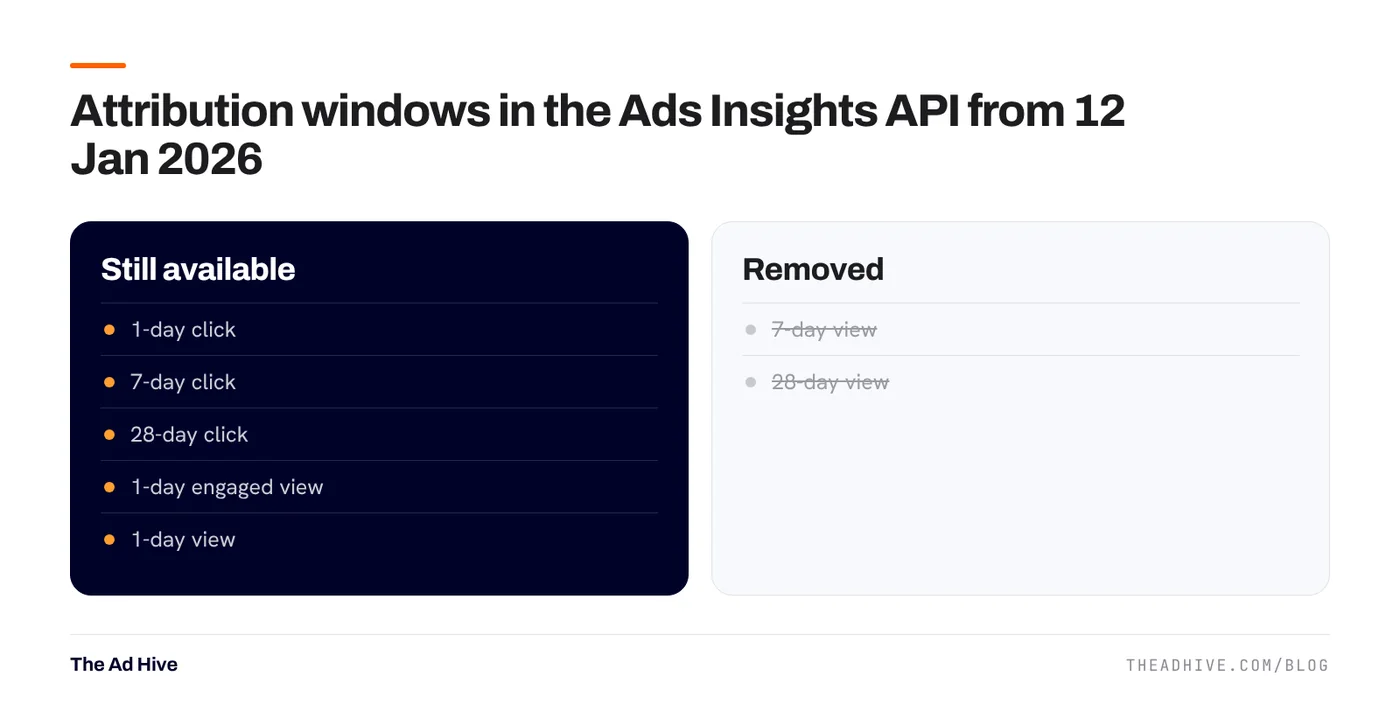
- Removed: 7-day view and 28-day view windows are no longer returned by the API.
- Still available: 1-day click, 7-day click, 28-day click, 1-day engaged view and 1-day view, plus defaults based on your attribution setting.
- Shorter history for some breakdowns: unique-count fields and hourly breakdowns are limited to 13 months; frequency breakdowns to 6 months.
- Totals unaffected: total values for fields remain available for up to 37 months.
What this means for you
Your old reports may not compare
If last year’s reports used 7-day click plus 7-day view, this year’s can’t. Rebuild your comparison on a window that exists in both periods, such as 7-day click.
Third-party dashboards may have changed silently
Tools that pull from the API had to switch windows. Check what your reporting tool now uses before comparing month on month.
Long-term frequency analysis needs exports
If you track frequency over long periods, export it monthly. The API only keeps 6 months of frequency breakdowns.
Which window should you use?
There is no perfect answer, only a consistent one.
- Most D2C and e-commerce: 7-day click with 1-day view or 1-day engaged view. It captures the normal decision time without giving too much credit to views.
- High-ticket or long decisions: look at 28-day click as a second view, not as your main number.
- Strict profit reporting: 7-day click alone is the most conservative view.
The most important rule: use the same window in every report you compare.
The iOS problem hasn’t gone away
Since Apple’s App Tracking Transparency arrived with iOS 14.5, many iPhone users opt out of tracking. Meta fills part of the gap with modelling and with the Conversions API. Missing signals still mean Meta’s numbers are estimates. A proper Conversions API setup narrows the gap.
How we read Meta results honestly
- Label the number. “Meta-attributed purchase value, 7-day click 1-day view, incl. returns.” Never call it sales.
- Cross-check with the store. Compare Meta’s purchases with new-customer orders over the same dates. Expect a gap from attribution, cancellations and returns.
- Track a blended number. MER (total store sales ÷ total ad spend) can’t be inflated by any one platform. See ROAS vs MER vs POAS.
- Run a lift test when spend is large enough. It’s the cleanest way to see what Meta truly adds.
Purchases keep arriving for days after a click, so the most recent week always looks weaker. Leave a gap before judging a campaign or a creative.
If your reports don’t agree with each other and nobody can explain why, our forensic PPC audit reconciles platform data with store data and shows where the gaps come from. For brands that want this handled every month, see our PPC management.
Frequently asked questions
What changed in Meta attribution in January 2026?
From 12 January 2026, Meta's Ads Insights API stopped returning the 7-day view and 28-day view attribution windows. Unique-count and hourly breakdowns were limited to 13 months of history, and frequency breakdowns to 6 months.
Which Meta attribution window should I use?
For most e-commerce brands, 7-day click and 1-day view (or 1-day engaged view) is a sensible default. Whatever you choose, keep it the same across reports so you compare like with like.
Why doesn't Meta's purchase count match my store orders?
Meta counts conversions it attributes to ads within your window, including view-through, and its value includes orders later returned or cancelled. Your store counts every order. Some gap is normal; a very large gap usually points to tracking problems.
Sources
- Meta for Developers: Ads Insights API metric availability updates (16 Oct 2025)
- Meta for Developers: Conversions API best practices
Sources checked on 15 November 2026. Platform features change often; check the linked pages for the latest details.
Want this done on your account?
We manage Google and Meta ads for e-commerce, D2C and lead-gen brands. Every engagement starts with a manual review of what is already running.
Related guides
Meta Conversions API: setup checklist, deduplication and Event Match Quality
Meta's delivery system can only learn from the purchases it sees. The Conversions API fills the gaps the pixel misses, if you set it up with…
ROAS vs MER vs POAS: which number should run your ad budget?
ROAS tells you what a platform claims. MER tells you what the business got. POAS tells you whether you made money. You need all three, used…

Advantage+ sales campaigns: setup, existing-customer caps and when they work
Advantage+ sales campaigns (formerly Advantage+ shopping) let Meta automate audience, placements and budget in one campaign. Set up well, they are the backbone of most D2C…