Lead gen on Google Ads: feed back lead quality with offline conversions
If Google Ads only sees form fills, it will find you more form fills, good or bad. Sending qualified leads and sales back from your CRM teaches it to find buyers instead.
Key takeaways
- A form fill is not a customer. If Google only sees form fills, it optimises for volume, not quality.
- Send qualified leads and won deals back to Google Ads from your CRM.
- Use enhanced conversions for leads (hashed email) and keep sending GCLIDs where you have them.
- Upload often, ideally daily, so bidding learns fast.
Lead-gen accounts have a problem e-commerce accounts don’t. The conversion Google sees, a form fill, is not the thing you want. Some leads become customers. Many don’t answer the phone. A few are spam. Google can’t tell them apart unless you tell it.
Why form-fill bidding goes wrong
Smart Bidding finds more of whatever you count as a conversion. If every form fill counts the same, Google learns to find the cheapest form fills. Those often come from broad searches, low-intent placements or people who just want a free quote. Cost per lead falls. Sales don’t.
This gets worse with automation that expands reach, like broad match, AI Max or Performance Max. See our AI Max guide for why we fix lead quality before testing it.
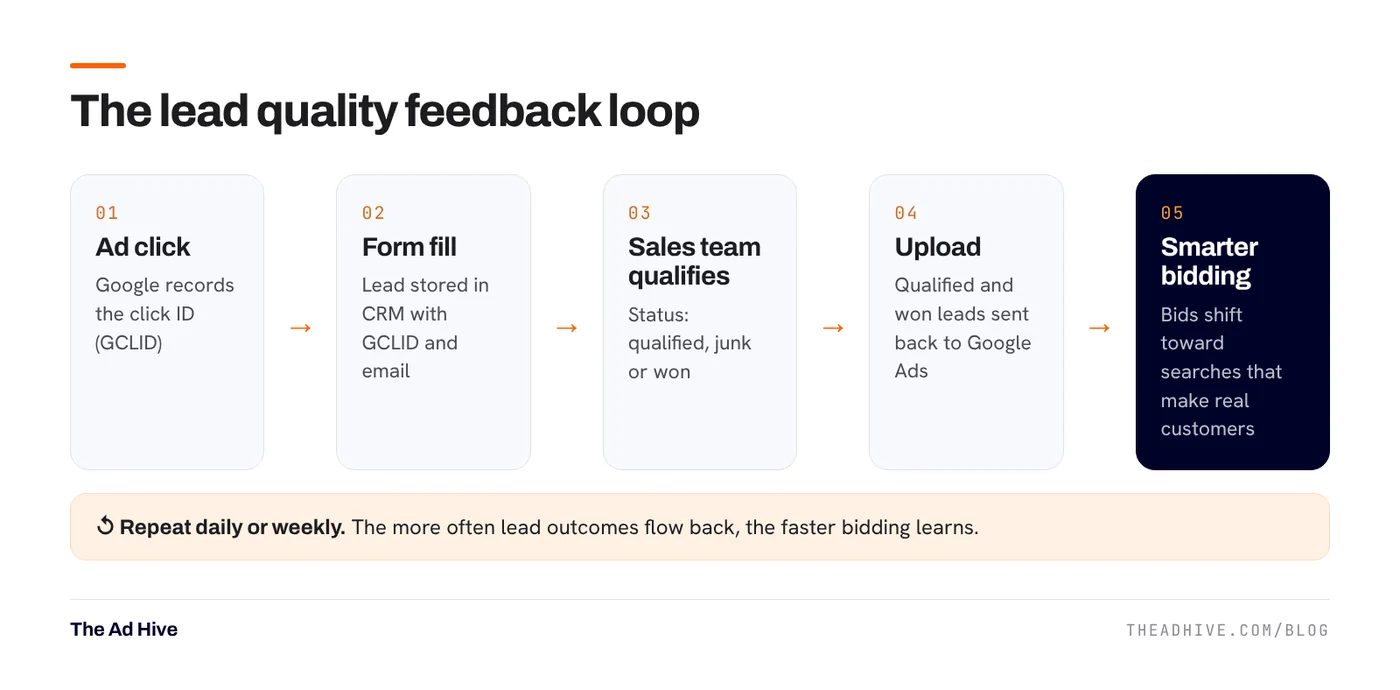
The feedback loop
Two ways to match leads back to ads
1. Click ID (GCLID)
When someone clicks a Google ad, a click ID called GCLID is added to the landing page URL. Capture it in a hidden form field and store it with the lead. Later, upload the lead’s status with that GCLID.
2. Enhanced conversions for leads
This matches using hashed data the person typed into your form, usually email or phone. Google matches it to signed-in users who engaged with your ads. It still works when the GCLID is lost, for example when someone comes back later and fills the form.
Google’s current guidance: if you already import offline conversions, upgrade to send user-provided data alongside your GCLIDs. Google recommends including GCLIDs whenever possible, and says they’re required if you’re not using a tag to collect user-provided data. You can send this through Data Manager, the Google Ads API, the Google tag or Google Tag Manager.
Setup checklist
- Capture the data. Store GCLID (and other click IDs if present) plus email and phone with every lead.
- Define stages clearly. For example: new, contacted, qualified, proposal, won, lost, junk. Agree on what “qualified” means with your sales team.
- Create conversion actions in Google Ads for the stages you’ll upload, such as “Qualified lead” and “Won deal”.
- Choose the primary goal. Make the stage that best predicts revenue and still has volume the primary conversion. Keep raw form fills as secondary.
- Upload on a schedule. Daily is best. Data Manager and CRM integrations can automate it.
- Add values. If deal sizes vary, upload the value so bidding favours bigger customers.
If you only win a handful of deals a month, “won deal” alone gives Google too little data. Use “qualified lead” as the primary goal and add “won deal” for reporting until volume grows.
What changes after you switch
- Cost per form fill often goes up. That’s expected.
- Cost per qualified lead and cost per customer should come down over the following weeks.
- Search terms shift toward higher-intent queries. Keep running your negative keyword routine.
Don’t forget consent and data rules
You’re sending hashed personal data to Google. Make sure your forms and privacy policy cover it, and that consent is collected where your market requires it. Our enhanced conversions and Consent Mode guide covers the basics, including India’s DPDP Rules.
Which platform for which lead?
Google Search captures people already looking. For B2B, LinkedIn is usually the stronger lead platform because you can target by job title and company. Meta can work for consumer lead-gen with good qualification. Whatever the platform, the same principle holds: feed back quality, or the algorithm will chase quantity.
Our forensic PPC audit checks how lead quality flows back into your ad accounts. Our PPC management sets up the loop and runs it.
Frequently asked questions
What is the difference between offline conversion import and enhanced conversions for leads?
Offline conversion import traditionally matches sales back to ad clicks using the GCLID. Enhanced conversions for leads matches using hashed data like email from the lead form. Google lets you send user-provided data alongside your GCLIDs, and recommends including GCLIDs whenever possible.
Which lead stages should I upload?
Start with the stage that best predicts revenue and has enough volume, often 'qualified lead'. Add 'won deal' with a value as a second action once volume allows. Too few uploads give the bidder too little to learn from.
Do I need a CRM for this?
You need somewhere that stores each lead with its click ID or email and its final status. A CRM makes it easier, but a well-kept spreadsheet with scheduled uploads through Data Manager can work for smaller teams.
Sources
- Google Ads Help: Your guide to upgrading offline conversion imports
- Google Ads Help: About enhanced conversions for leads
- Google Ads Help: About offline conversion imports
Sources checked on 15 November 2026. Platform features change often; check the linked pages for the latest details.
Want this done on your account?
We manage Google and Meta ads for e-commerce, D2C and lead-gen brands. Every engagement starts with a manual review of what is already running.
Related guides
Enhanced conversions and Consent Mode: fix Google Ads tracking before you touch bids
Smart Bidding is only as good as the conversions it sees. Enhanced conversions recover lost sales; Consent Mode keeps measurement working when people decline cookies. Here…
Search terms and negative keywords: a weekly routine that stops wasted spend
Most wasted Google Ads spend hides in the search terms report. A 30-minute weekly routine, the right negative match types and a few shared lists fix…
AI Max for Search campaigns: what it changes and how to test it safely
AI Max is not a new campaign type. It is a layer you switch on inside a Search campaign, and it can reach searches your keywords…