AI Max for Search campaigns: what it changes and how to test it safely
AI Max is not a new campaign type. It is a layer you switch on inside a Search campaign, and it can reach searches your keywords never would. Here is how to test it without losing control.
Key takeaways
- AI Max is a switch inside a Search campaign, not a new campaign type.
- It has three parts: search term matching, text customisation and final URL expansion.
- Each part has its own controls, so you can test one at a time.
- Test it as an experiment on a campaign that is not limited by budget.
AI Max for Search is Google’s answer to a simple problem. People search in longer, messier ways than any keyword list can cover. AI Max lets a Search campaign reach those searches, write ad text for them and pick the landing page.
That can find new sales. It can also send budget to searches and pages you would never have chosen. Here is how it works and how we test it.
What AI Max includes
Google describes AI Max as a layer on top of an existing Search campaign. It has three features.
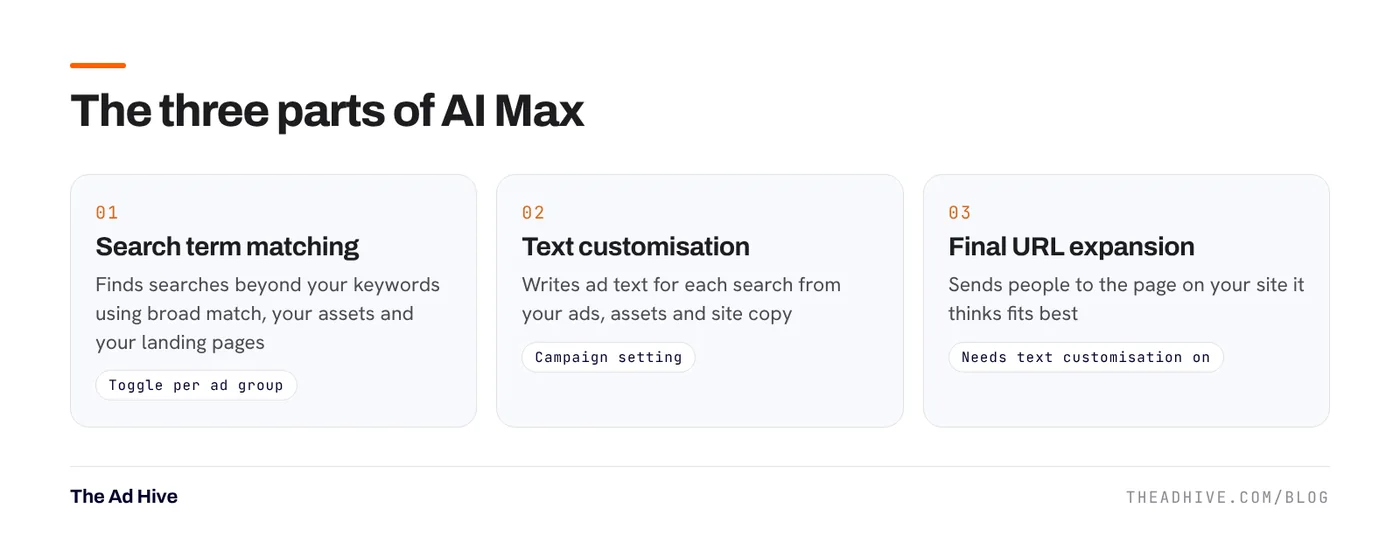
1. Search term matching
This expands reach beyond your keywords. Google says it uses broad match, your assets and your landing pages to find relevant searches. It is on by default when you turn on AI Max, and you can switch it off per ad group.
2. Text customisation
This used to be called “automatically created assets”. It writes ad text tailored to each search, using your existing ads, your assets and the copy on your landing pages. It is a campaign-level setting.
3. Final URL expansion
This sends people to the page on your site that Google thinks fits the search best, instead of the URL you set. It only works if text customisation is on, so the ad text can match the new page.
The controls you get
- Brand inclusions: tie ads to specific brands. Campaign or ad group level.
- Brand exclusions: stop ads showing for certain brands. Campaign level only.
- Locations of interest: reach people based on the place in their search, even for keywordless matches. Ad group level.
- URL exclusions: block pages from being used as landing pages. Campaign level.
- URL inclusions: add pages final URL expansion missed. Ad group level.
Negative keywords still work as normal. Remember that negatives don’t match close variants, so add plurals and synonyms yourself. Our negative keyword guide has the full routine.
Where AI Max helps and where it hurts
Good fit
- Stores with large catalogues where people search in many ways for the same product.
- Accounts with strong conversion tracking and enough volume to learn.
- Campaigns with good landing pages across the site, so any page Google picks is a decent one.
Poor fit
- Regulated categories where every word in an ad needs approval.
- Lead-gen accounts where a “conversion” is any form fill, good or bad. AI Max will chase cheap, low-quality leads. Fix lead quality first with offline conversion tracking.
- Sites with thin or outdated pages that you don’t want as landing pages.
- Campaigns limited by budget. Google itself warns that AI Max won’t be effective if the campaign is budget-limited.
How we test AI Max on client accounts
- Pick one healthy campaign. Stable tracking, steady conversions and not limited by budget.
- Set up exclusions first. Add brand exclusions if you sell your own brand, and URL exclusions for pages like careers, blog, terms or out-of-stock collections.
- Check your tracking template. Google warns that templates that can’t handle dynamic landing pages may cause 404 errors with final URL expansion.
- Run it as an experiment. Use the Experiments page to split traffic between the original campaign and an AI Max version. This gives a fair comparison instead of a before-and-after guess.
- Judge on business results. Look at conversions and value, then check lead quality or margin. More clicks alone is not a win.
If you switch on all three features at once and results change, you won’t know why. Start with search term matching. Add text customisation and URL expansion only after you trust the first one.
How to read AI Max reports
Google added AI Max data to several reports:
- Search terms report: “AI Max” appears as a match type. A source column shows whether a match came from broad match expansion or keywordless matching.
- Keywords report: summary rows show the total AI Max contribution.
- Landing pages report: a “Selected by” column shows how pages chosen by AI Max perform.
- Asset report: shows how AI Max-written assets perform on spend and conversions.
Check the search terms report weekly for the first month. Add negatives for clear waste. Pull pages that convert poorly into your URL exclusions.
Our view
AI Max can add good volume, but only on top of sound basics: clean tracking, a tidy account and landing pages worth landing on. If those aren’t in place, it will scale the problems too. Our forensic PPC audit checks those basics before any automation is switched on, and our PPC management team runs these tests as part of the monthly plan.
Frequently asked questions
Is AI Max a new campaign type?
No. Google describes AI Max as a set of targeting and creative features you turn on inside an existing Search campaign.
How do I see which searches came from AI Max?
The search terms report shows AI Max as a match type, with a source column that says whether the match came from broad match expansion or keywordless matching.
Can I stop AI Max sending traffic to the wrong pages?
Yes. Use URL exclusions at campaign level to block pages, and URL inclusions at ad group level to add pages it missed. Check your tracking template first, because Google warns that incompatible templates can cause 404 errors.
Sources
- Google Ads Help: Optimize Google Ads with AI Max for Search campaigns
- Google Ads Help: About negative keywords
Sources checked on 15 November 2026. Platform features change often; check the linked pages for the latest details.
Want this done on your account?
We manage Google and Meta ads for e-commerce, D2C and lead-gen brands. Every engagement starts with a manual review of what is already running.
Related guides
Search terms and negative keywords: a weekly routine that stops wasted spend
Most wasted Google Ads spend hides in the search terms report. A 30-minute weekly routine, the right negative match types and a few shared lists fix…
Performance Max best practices for 2026: how to get control back
Performance Max used to be a black box. In 2025 and 2026 Google added the controls advertisers kept asking for. Here is how to use them…

Landing pages for paid traffic: 12 fixes that lift conversion rate
Better ads bring better visitors. The landing page decides whether they buy. These are the twelve fixes we check first on pages that receive paid traffic.