Search terms and negative keywords: a weekly routine that stops wasted spend
Most wasted Google Ads spend hides in the search terms report. A 30-minute weekly routine, the right negative match types and a few shared lists fix most of it.
Key takeaways
- Review search terms every week. It is the cheapest fix in Google Ads.
- Negative keywords don’t match close variants. Add plurals and synonyms yourself.
- Use three levels: shared lists, campaign negatives and ad group negatives.
- Only block terms after checking their conversions. Odd-looking terms sometimes sell.
In almost every account we review, some budget is going to searches that will never buy. Job seekers, people wanting free versions, students, buyers of a competitor’s spare parts. None of it shows up as an error. It just sits in the search terms report.
The fix is not clever. It is a routine you run every week.
Keywords vs search terms
A keyword is what you bid on. A search term is what the person actually typed. With broad match and AI Max, one keyword can trigger hundreds of different searches. The search terms report shows you which ones you paid for.
How negative match types work
Negative keywords behave differently from normal keywords. Google’s help page uses “running shoes” as the example.
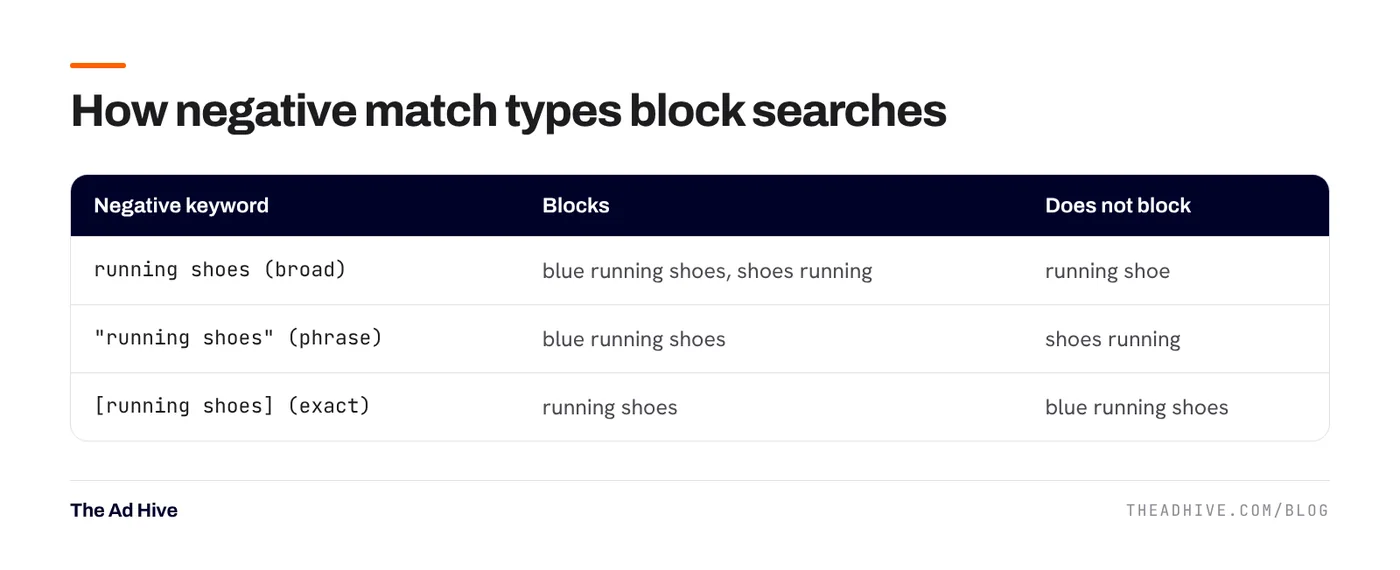
The most important rule: negatives don’t match close variants. Blocking “free” does not block “freebie”. Blocking “job” does not block “jobs”. Casing and common misspellings are handled for you, but plurals and synonyms are not.
The 30-minute weekly routine
- Open the search terms report for the last 7 days. Sort by cost, highest first.
- Scan the top 50 terms. For each, ask: could this person buy what we sell?
- Check conversions before blocking. A strange term with sales stays. A term with spend and no sales over a longer period is a candidate.
- Decide the level. Never relevant anywhere? Shared list. Wrong for this campaign only? Campaign negative. Belongs in a different ad group? Ad group negative.
- Pick the match type. Use phrase match for most negatives. Use exact when you only want to block one precise search.
- Add good terms as keywords. A search term that converts well deserves its own keyword and ad.
Shared lists we set up on day one
These lists save time on every new account. Adjust them to the business before using them.
- Jobs and careers: job, jobs, career, careers, salary, hiring, vacancy, internship.
- Free and cheap seekers (premium brands only): free, freebie, cheap, cheapest.
- Research and study: pdf, wiki, meaning, definition, course, syllabus (unless you sell courses).
- DIY and repairs (for product sellers): how to make, diy, repair, spare part.
- Competitor names, if you don’t want to run on them.
An account-level negative list now applies to all eligible Search and Shopping traffic in the relevant campaign types. That makes it the easiest place to block words you never want.
Performance Max and AI Max
Performance Max now supports campaign negatives and shared negative lists, and its search terms report is available to all advertisers. Add the same routine to your PMax campaigns. Our Performance Max guide covers the full weekly check.
If you use AI Max for Search, the search terms report shows “AI Max” as a match type. Review these terms closely in the first few weeks. See our AI Max testing guide.
On Display and Video campaigns, negatives exclude topics rather than exact words, so they may block pages about related content. Google notes that only up to 1,000 negative keywords are considered at account level for these campaigns.
Common mistakes
- Blocking your own keywords. A broad negative like “shoes” in a shoe store will stop the campaign. Check a new negative against your keyword list.
- Blocking too soon. One click is not a trend. Wait for enough spend to judge.
- Only checking the top terms. Low-cost terms add up. Once a month, sort by clicks and look deeper.
- Forgetting lead quality. For lead-gen, a term may convert into junk leads. Feed lead quality back with offline conversions so you can tell.
How much can this save?
It depends on how loose the account is. Tight exact-match accounts waste little. Accounts that rely on broad match or PMax with no negatives often waste far more. The only way to know is to look at your own report.
Search term waste is one of the first things we check in our forensic PPC audit, along with the rest of our PPC audit checklist.
Frequently asked questions
Do negative keywords block close variants like plurals?
No. Google states that negative keywords won't match close variants or other expansions. Add singular, plural and synonym forms yourself.
Where should I add negative keywords: ad group, campaign or list?
Use shared lists for words you never want anywhere, like 'jobs' or 'free'. Use campaign negatives for terms that are wrong for one campaign. Use ad group negatives to steer searches to the right ad group inside a campaign.
Can I add negative keywords to Performance Max?
Yes. Performance Max supports campaign-level negative keywords and shared negative keyword lists, which apply to its Search and Shopping traffic.
Sources
- Google Ads Help: About negative keywords
- Google Ads Help: Unlock more visibility and control in Performance Max
Sources checked on 15 November 2026. Platform features change often; check the linked pages for the latest details.
Want this done on your account?
We manage Google and Meta ads for e-commerce, D2C and lead-gen brands. Every engagement starts with a manual review of what is already running.
Related guides

AI Max for Search campaigns: what it changes and how to test it safely
AI Max is not a new campaign type. It is a layer you switch on inside a Search campaign, and it can reach searches your keywords…

Performance Max best practices for 2026: how to get control back
Performance Max used to be a black box. In 2025 and 2026 Google added the controls advertisers kept asking for. Here is how to use them…
The PPC audit checklist: 30 checks across tracking, structure, bids and creative
Use this checklist to review your own Google and Meta accounts. It follows the order we use in our forensic audits: tracking first, because every other…