
Google Shopping feed optimisation: the fixes that lift clicks and sales
In Shopping and Performance Max, your product feed does the job keywords do in Search. Better titles and complete attributes are often the cheapest growth lever an e-commerce brand has.
Key takeaways
- In Shopping and Performance Max, Google matches searches to your feed, not to keywords.
- Titles matter most. Front-load the words shoppers search for.
- Fill every attribute that applies: colour, size, material, gender, product type and identifiers.
- Fix disapprovals weekly. A disapproved product earns nothing.
When a Shopping or Performance Max campaign stalls, most advertisers reach for bids and budgets. In our experience the feed is usually the bigger problem. Google can only show your product for searches it understands your product fits. The feed is how it understands.
Why the feed is your keyword list
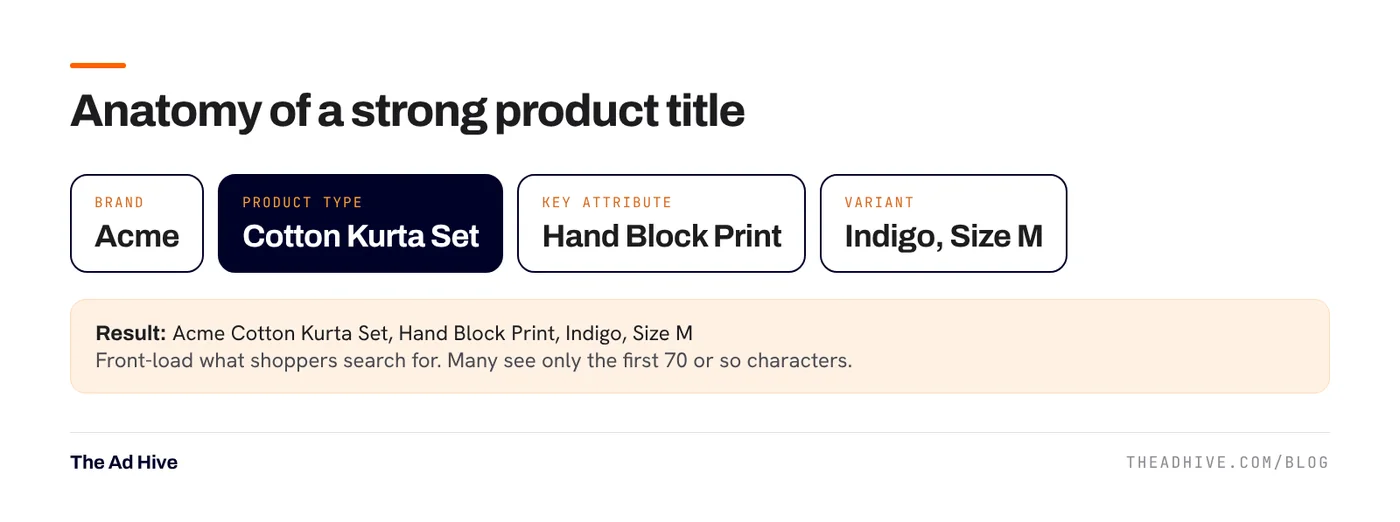
Shopping ads have no keywords. Google reads your titles, descriptions, categories and attributes, then decides which searches match. A product called “Kurta 1042” matches almost nothing. A product called “Women’s Cotton Kurta Set, Hand Block Print, Indigo, Size M” matches dozens of real searches.
Titles: the biggest single lever
Google’s title rules are simple:
- Up to 150 characters. Anything longer is cut off.
- Shoppers often see only the first 70 or so characters, so put the important words first.
- Describe the product on the landing page accurately.
- Include variant details like size, colour or flavour.
Title formulas by category
| Category | Formula | Example |
|---|---|---|
| Apparel | Brand + gender + product + material/style + colour + size | Acme Women’s Linen Shirt, Relaxed Fit, White, M |
| Beauty | Brand + product + key benefit + size | Acme Vitamin C Face Serum, Brightening, 30 ml |
| Electronics | Brand + product + model + key spec + colour | Acme Wireless Earbuds X2, 30-Hour Battery, Black |
| Home | Brand + product + material + size + colour | Acme Cotton Bedsheet Set, King Size, 300 TC, Grey |
Brand goes first when it helps people decide. For a lesser-known brand, the product type may deserve the front spot.
What to keep out of titles
- Promotional text: price, “sale”, “free shipping”, dates, your store name.
- All caps for emphasis.
- Symbols, HTML and gimmicky characters.
Attributes: give Google the full picture
Google’s product data specification lists many optional attributes. Optional does not mean unimportant. Each one adds detail Google can match against.
- Product identifiers: GTIN (barcode number) and brand where they exist. These help Google match your product to the right searches and comparisons.
- Google product category and product type: product type is your own category path. Make it specific.
- Colour, size, material, pattern, gender, age group: required for many apparel listings, and useful everywhere.
- Item group ID: ties variants together so Google treats them as one product family.
- Custom labels: not shown to shoppers. Use them to tag margin bands, best sellers or seasonal items, then split campaigns by them.
Images
- Use a clean main image of the actual product. No text overlays, watermarks or borders on the main image.
- Add lifestyle images as additional images.
- Make sure the image matches the variant. A red image on a blue variant is a poor experience and can cause issues.
A weekly feed health routine
- Check Merchant Center diagnostics. Fix disapprovals first, then warnings that limit performance.
- Check price and availability mismatches. Prices on the site and in the feed must match. Mismatches cause disapprovals.
- Review top products by impressions with low clicks. Their titles or images are often the problem.
- Review search terms in Shopping and PMax. Words people use that are missing from your titles are easy wins.
On Shopify and similar platforms, feed apps can overwrite titles every sync. Use a supplemental feed or feed rules for optimised titles, so the store stays clean and the feed stays strong.
How feed work connects to the rest of the account
Better titles improve matching. Custom labels let you set different ROAS targets by margin, which we explain in our Target ROAS guide. And the feed powers Performance Max, so every fix here helps there too. See our Performance Max guide.
Once people click, the product page has to close the sale. Our landing page guide covers what to fix next.
Feed audits are a core part of our e-commerce consulting work and our forensic PPC audit.
Frequently asked questions
How long can a Google Shopping product title be?
Up to 150 characters. Google warns that shoppers often see only the first 70 or so, so put the most important words first.
Can I put 'Sale' or the price in my product title?
No. Google's title guidelines say to avoid promotional text such as price, sale dates, shipping or your company name. Use the sale price attribute and promotions instead.
Will changing my feed reset my Performance Max learning?
Feed edits change how products match searches, so expect some movement. Make changes in batches and judge results over a few weeks, not days.
Sources
- Google Merchant Center Help: Title [title] attribute
- Google Merchant Center Help: Product data specification
Sources checked on 15 November 2026. Platform features change often; check the linked pages for the latest details.
Want this done on your account?
We manage Google and Meta ads for e-commerce, D2C and lead-gen brands. Every engagement starts with a manual review of what is already running.
Related guides
Performance Max best practices for 2026: how to get control back
Performance Max used to be a black box. In 2025 and 2026 Google added the controls advertisers kept asking for. Here is how to use them…

Landing pages for paid traffic: 12 fixes that lift conversion rate
Better ads bring better visitors. The landing page decides whether they buy. These are the twelve fixes we check first on pages that receive paid traffic.
ACOS vs TACoS on Amazon: how to read them and set targets
ACOS tells you how efficient your Amazon ads are. TACoS tells you whether they're growing the business. Read them together and you'll know when to push…