The PPC audit checklist: 30 checks across tracking, structure, bids and creative
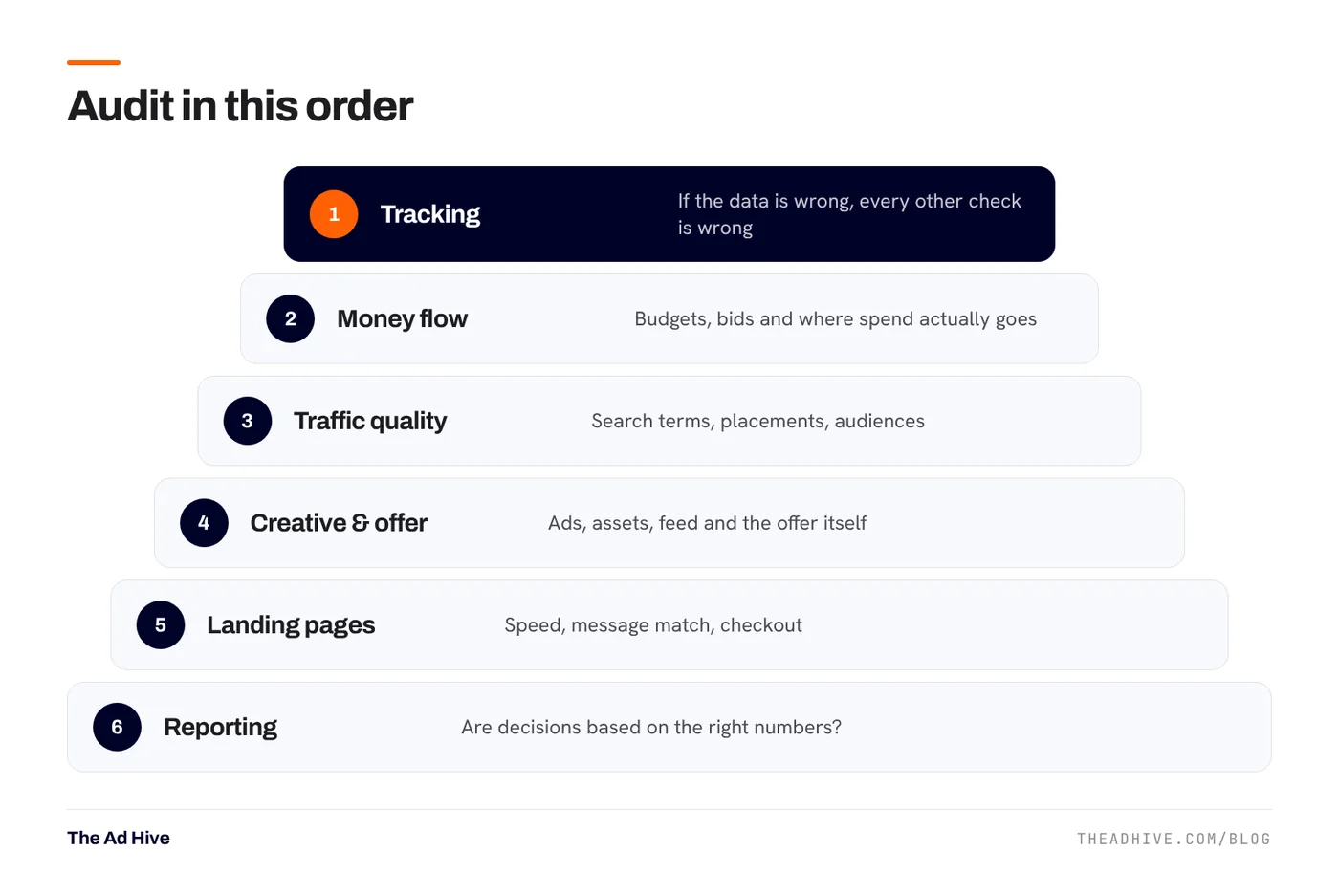
Use this checklist to review your own Google and Meta accounts. It follows the order we use in our forensic audits: tracking first, because every other finding depends on it.
Key takeaways
- Audit tracking first. Every other finding depends on it.
- Rank every issue by impact × effort, then fix the big, easy ones first.
- Check where money actually goes, not just what reports say.
- Judge success on business numbers (sales, margin, qualified leads), not platform numbers alone.
This is the checklist we follow when we review an ad account, condensed so you can run it yourself. It covers Google Ads and Meta Ads. Work through it in order. Tracking comes first because a wrong number upstream makes every later check misleading.
1. Tracking (checks 1–7)
- Primary conversions are real outcomes. Purchases or qualified leads, not page views or add-to-carts.
- No double counting. One primary purchase action per platform. Check for Google Ads tags and imported GA4 purchases both counting.
- Values are correct. Order value after discounts, consistent on tax and shipping.
- Enhanced conversions on (Google) and matching. See our enhanced conversions guide.
- Pixel + Conversions API deduplicated (Meta), with good Event Match Quality. See our CAPI checklist.
- Consent Mode live, and the banner actually changes consent states.
- Platform totals sanity-checked against the store or CRM for the same dates.
2. Money flow (checks 8–13)
- Spend by campaign matches priorities. Is the most money going to the best products or services?
- Budget-limited campaigns that perform well are flagged for more budget.
- Daily overspend is understood. Google can spend up to 2× the average daily budget on a single day, and up to 30.4× it in a month.
- Bid strategies match data volume. Target ROAS on a campaign with three sales a month will struggle. See our Target ROAS guide.
- Targets come from margins, not guesses.
- Brand spend is separated from non-brand so one doesn’t hide the other.
3. Traffic quality (checks 14–19)
- Search terms reviewed recently, with clear waste blocked. See our negative keyword routine.
- Shared negative lists exist for jobs, free, DIY and other never-relevant terms.
- Performance Max channel and search term reports checked for drift.
- Location settings target people in your area, not just people interested in it, unless that’s intended.
- Meta existing-customer share known and capped where growth is the goal.
- Placement and audience reports checked for spend with no results.
4. Creative and offer (checks 20–24)
- Enough distinct concepts live on Meta, not ten versions of one ad. See our creative framework.
- Responsive search ads have varied headlines, not the same line rephrased.
- Assets and extensions (sitelinks, callouts, images) in place.
- Product feed health: disapprovals, titles, attributes. See our feed guide.
- The offer is competitive. Price, shipping and returns compared with the top competitors people also see.
5. Landing pages (checks 25–28)
- Message match. The page says what the ad promised.
- Mobile speed. Check Core Web Vitals for the pages you pay to send traffic to.
- Quality Score components reviewed. Google says Quality Score is a diagnostic, not an auction input, but “below average” landing page experience is a clear signal.
- Checkout or form tested end to end on a phone, including payment and thank-you page.
Our landing page guide covers the fixes.
6. Reporting (checks 29–30)
- Numbers are labelled. Is it platform-attributed value or store sales? Including or excluding returns? Never mix them in one table.
- A blended number exists. MER or a similar store-level ratio, so no platform can claim the same sale twice. See ROAS vs MER vs POAS.
How to prioritise what you find
Score each issue on two scales, impact and effort, from 1 to 3. Fix high-impact, low-effort issues this week. Plan high-impact, high-effort ones. Park the rest.
| Example finding | Impact | Effort | Do it |
|---|---|---|---|
| Purchases double counted | High | Low | This week |
| No negative lists | Medium | Low | This week |
| Feed titles weak | High | Medium | This month |
| Landing page rebuild | High | High | Plan it |
Our forensic PPC audit is a manual, line-by-line review by a senior specialist. You get every finding ranked by impact and effort, with the fix for each. If you’d like us to then make the fixes, our PPC management picks up from the audit.
Frequently asked questions
How often should I audit my PPC accounts?
Run a light version of this checklist monthly and a full audit every six to twelve months, or whenever results change sharply without an obvious reason.
Is Quality Score part of a PPC audit?
It is a useful diagnostic, but Google says Quality Score is not an input in the ad auction and should not be treated as a KPI. Use its three parts, expected CTR, ad relevance and landing page experience, to find problems.
What is the most common problem found in PPC audits?
In our experience, broken or duplicated conversion tracking. It quietly distorts bidding, reporting and every decision built on them.
Sources
- Google Ads Help: About Quality Score
- Google Ads Help: About average daily budget
- Google Ads Help: About negative keywords
- Meta for Developers: Conversions API best practices
Sources checked on 15 November 2026. Platform features change often; check the linked pages for the latest details.
Want this done on your account?
We manage Google and Meta ads for e-commerce, D2C and lead-gen brands. Every engagement starts with a manual review of what is already running.
Related guides
Enhanced conversions and Consent Mode: fix Google Ads tracking before you touch bids
Smart Bidding is only as good as the conversions it sees. Enhanced conversions recover lost sales; Consent Mode keeps measurement working when people decline cookies. Here…
Search terms and negative keywords: a weekly routine that stops wasted spend
Most wasted Google Ads spend hides in the search terms report. A 30-minute weekly routine, the right negative match types and a few shared lists fix…
ROAS vs MER vs POAS: which number should run your ad budget?
ROAS tells you what a platform claims. MER tells you what the business got. POAS tells you whether you made money. You need all three, used…